

Zanaco
Why Choose Zanaco
Free Bank Charge
No handling fee for local and international remittances.
Fast Bank Transfer
Payment via Zanaco is easy and fast.
Accepts All Currencies
You can choose any currency at any of our branches.
*Available payment methods may vary by country. For further assistance, kindly contact our local sales office in/nearby your area.
You can choose to pay via Zanaco after reserving your vehicle(s).
For more details on how to make payments via Zanaco, please contact us via WhatsApp/Phone or contact your sales representative.


Important Notice: Beware of Payment Fraud
Please make payments only to the official bank accounts or payment methods displayed on this website. We will not be responsible for any loss, damage, or failed transaction resulting from payment made to an incorrect, fraudulent, or unauthorized bank account or payment destination.
If you receive suspicious payment instructions by email, phone, SMS, WhatsApp, or any other channel, please contact us before making payment.
Bank Account Details
Please confirm the following official bank account details before making a payment.
We are not responsible for payments made to incorrect, fraudulent, or unauthorized accounts.
Beware of Fake Invoice Fraud
Before making a payment, please make sure the invoice and bank account details are legitimate.
Learn How to Identify and Avoid Fake Invoice FraudHow to Pay with Zanaco (In-Branch)
Press "Buy Now" to Purchase
On the car detail, press the "Buy Now" button to begin your purchase and proceed to the Payment Information.

Select "Pay later" as Your Payment Method
On the Payment Information, select "Pay later" from the options under "3. Payment method", and then proceed by selecting "Confirm and pay".

Receive Representative’s Contact
Once you have selected "Confirm and pay", a completion page will be displayed, and our representative will contact you regarding the payment method.
Please wait for their contact to decide how to proceed with the payment.

Request Zanaco Invoice From Your Sales Representative
Once your representative contacts you, please inform them that you would like to pay via Zanaco in order to receive the invoice.
Print Out the Invoice for Payment
You’ll receive an invoice attached via email.
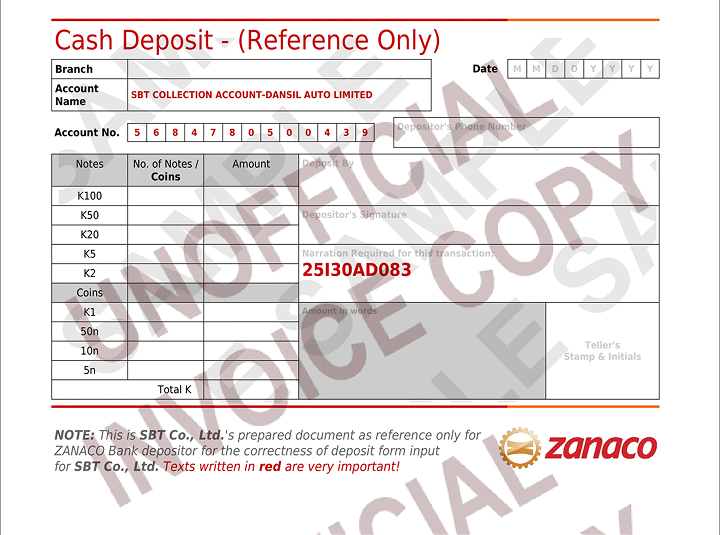
Print the invoice and see the first page as Cash Deposit Reference.
- Email Sample
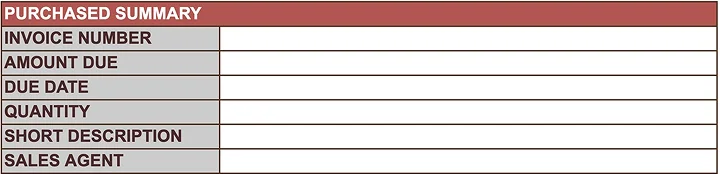
[DOWNLOAD INVOICE] for the complete details of your purchased unit/s
Open the link to download the invoice and cash deposit reference.
- Invoice Sample
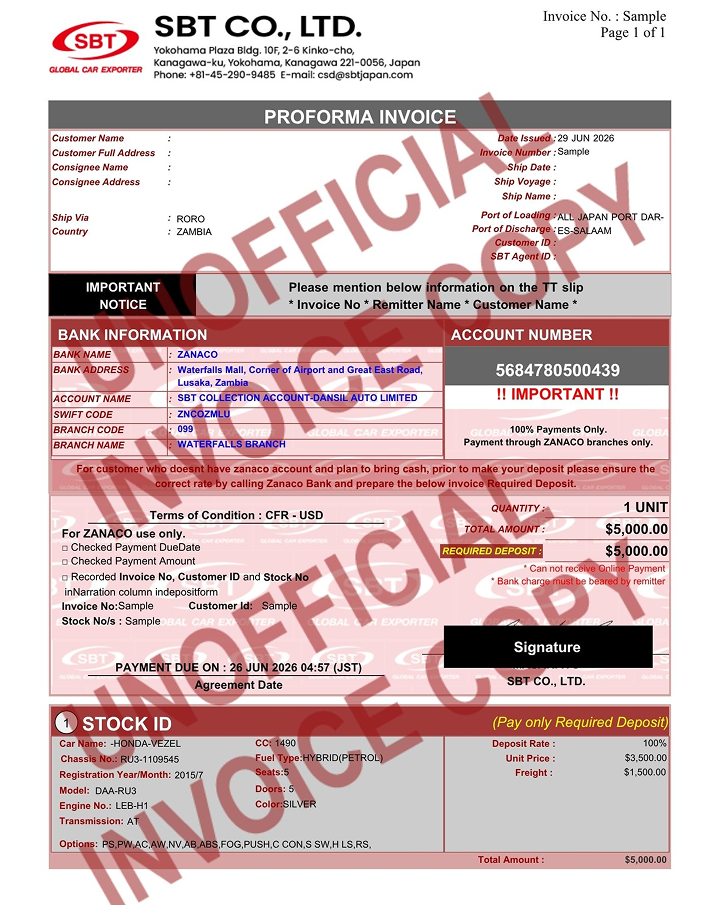
- Cash Deposit (Reference) Sample
Visit Zanaco Branch
Go to any Zanaco branch and fill out the Cash Deposit Slip/Form.
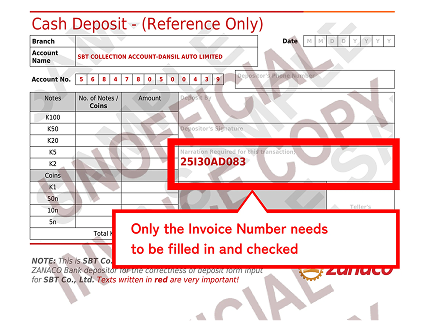
Fill out all fields as shown on the sample slip.
*Make sure to write the number given in the Cash Deposit sample.
Complete Your Payment
Make your payment using the filled-out Cash Deposit Slip.
This completes the process.
You will be contacted by your representative for the next steps.
Attention
Important: Check Rates at Zanaco Before Payment
Please note that the exchange rate at the time of payment may differ from the rate at the time of purchase.
Please check the exchange rate at the Zanaco counter and deposit the exact amount for your purchase.
Sample Case — In case of Insufficient Amount
Purchase Date: Dec. 12th
Purchase Amount 2,000 USD = 34,430 ZMW
You calculate as 1 USD = 17 ZMW (approx.)
Payment Date: Dec. 15th
Purchase Amount 2,000 USD = 37,000 ZMW
Zanaco Rate calculates as 1 USD = 18.5 ZMW (approx.)
On Dec 15th, you will bring 34,430 ZMW to the Zanaco window with the calculations of Dec. 12th.
The actual exchange rate on Dec. 15th has increased, so the amount will decrease to less than 2,000 USD.
For more information, please visit the Zanaco official website to check the latest exchange rate.
Payment Options
Select a payment method to view details

Frequently Asked Questions
You can choose to pay via Zanaco after reserving your vehicle(s).
For more details on how to make payments via Zanaco, please contact us via WhatsApp/Phone or contact your sales representative.